
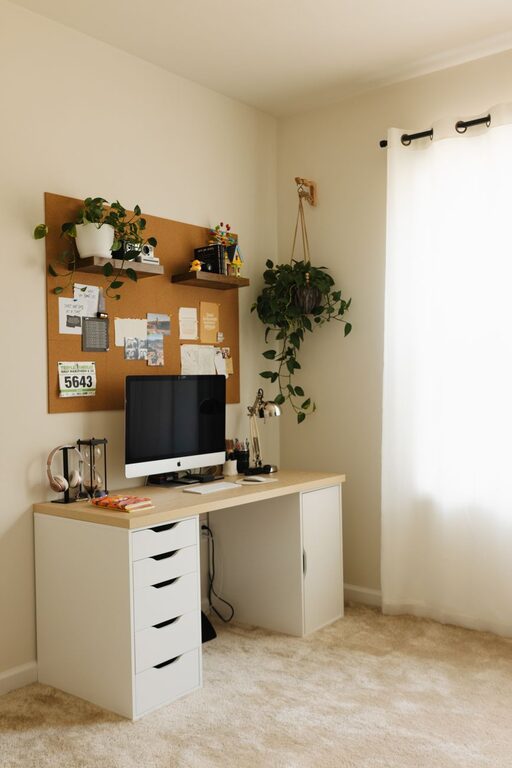
Tips for Creating a Cozy and Functional Home Workspace
Creating a cozy and functional home workspace is essential for anyone working remotely or managing tasks from home. A well-designed space can enhance productivity, reduce stress, and make working from home more enjoyable. Whether you have a dedicated room or a small corner, these tips will help you create a workspace that feels inviting and supports your daily tasks.
Choose the Right Location
The first step in setting up your home workspace is choosing a suitable location. The ideal spot is quiet, has good natural light, and is free from distractions.
– Consider natural light: Position your desk near a window if possible. Natural light boosts mood and focus.
– Minimize distractions: Find a space with minimal foot traffic, away from noisy household areas like the kitchen or TV.
– Think about ergonomics: Opt for a spot where you can set up your desk and chair comfortably with enough room to move.
If space is limited, look for creative solutions like a corner nook, an unused closet, or a small desk in the living room.
Invest in Comfortable and Supportive Furniture
Comfort is key in a home workspace because you’ll likely spend many hours sitting and working.
– Ergonomic chair: Choose a chair that supports your back and promotes good posture. Adjustable height and lumbar support are important features.
– Desk size: Select a desk that fits your work needs. It should have enough surface area for your computer, notebooks, and other essentials without feeling cluttered.
– Standing options: Consider a sit-stand desk or a converter to alternate between sitting and standing during the day. This can improve comfort and health.
Adding a footrest or a supportive cushion can further improve your sitting experience.
Organize Your Workspace Efficiently
A cluttered desk can distract you and slow you down. Keeping your workspace organized helps maintain focus and efficiency.
– Use storage solutions: Drawers, shelves, and desk organizers keep supplies and documents tidy and within reach.
– Cable management: Use clips or sleeves to tidy cables and chargers to prevent messy tangles.
– Minimal decorations: Add only a few personal or inspiring items to your desk to keep the area inviting but distraction-free.
Set aside time at the end of each day to tidy your workspace. This habit helps you start fresh the next morning.
Personalize Your Space for Warmth and Inspiration
Creating a cozy atmosphere makes your workspace a pleasant place to spend time.
– Add soft textures: A small rug, cushions, or a cozy throw can add comfort and soften the space visually.
– Incorporate plants: Greenery can improve air quality and add a calming influence.
– Use warm lighting: Avoid harsh overhead lights; instead, opt for desk lamps or floor lamps with warm bulbs.
– Decorate with art or photos: Personal images or artwork that inspires you can boost creativity and add personality.
Just remember not to overdo it — too many items can start to feel chaotic.
Optimize Lighting for Comfort and Productivity
Proper lighting is vital to reduce eye strain and create a pleasant work environment.
– Maximize daylight: Position your desk to get daylight without glare on your screen.
– Use layered lighting: Combine ambient lights, task lighting, and accent lighting for flexibility.
– Adjust brightness: Use controls or multiple lamps so you can adjust lighting throughout the day according to your needs.
Avoid blue light exposure late in the day to help maintain your natural sleep cycle.
Manage Noise and Distractions
Noise and interruptions can seriously disrupt your focus.
– Noise-cancelling headphones: These can be great if background noise is unavoidable.
– White noise machines: Playing soft background sounds can mask distracting noises.
– Set boundaries: Communicate to family or housemates the hours you need undisturbed work time.
Organize your schedule so that you handle tasks requiring the most focus during quieter parts of the day.
Establish a Routine and Clear Work-Life Boundaries
A dedicated workspace helps, but setting routines is equally important.
– Set regular work hours: Sticking to a schedule helps your mind distinguish work time from personal time.
– Take breaks: Short breaks every hour improve focus and reduce fatigue.
– End-of-day rituals: Clear your workspace or turn off your computer to signal the end of the day.
Creating these habits promotes a healthy balance and prevents burnout.
Make Technology Work for You
Having the right technology simplifies work and boosts efficiency.
– Reliable internet: Ensure your connection is strong enough for video calls and uploading documents.
– Quality equipment: Invest in a good quality webcam, microphone, and keyboard to improve your work experience.
– Backup plans: Have backup chargers, external drives, or cloud storage to protect your work.
Keep software updated and secure for smooth operation.
—
By thoughtfully designing your home workspace with comfort, function, and personal touches, you can create an environment that supports your work and well-being. Start small, experiment with what works best for you, and enjoy the benefits of a cozy and efficient workspace right at home.
